Head tracking for PC sims, from the phone you already own
Prop your phone on the monitor and the in-game view follows your head. It works with games that read TrackIR or FreeTrack. No app, no webcam, no OpenTrack.
Version 0.2.0 · early access · Windows 10/11 · iPhone or Android
How it works
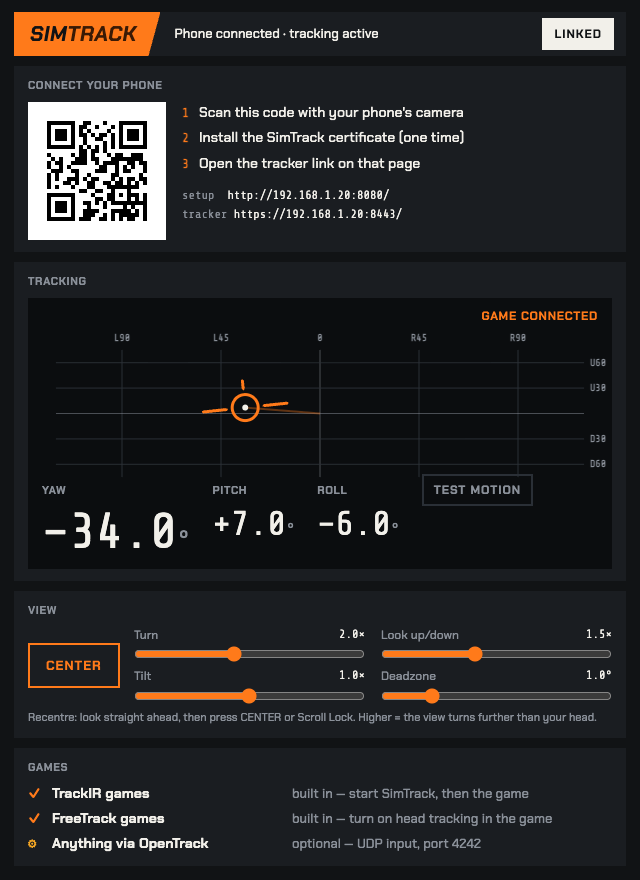
Face tracking runs in your phone's browser. Your PC hands the result to the game the same way TrackIR hardware does. First setup takes about two minutes.
- 01
Start SimTrack on the PC
Unzip and double-click. A window opens with a QR code.
- 02
Scan the code with your phone
The setup page installs one small certificate so the camera works over your home network. Only the first time.
- 03
Prop the phone, start the game
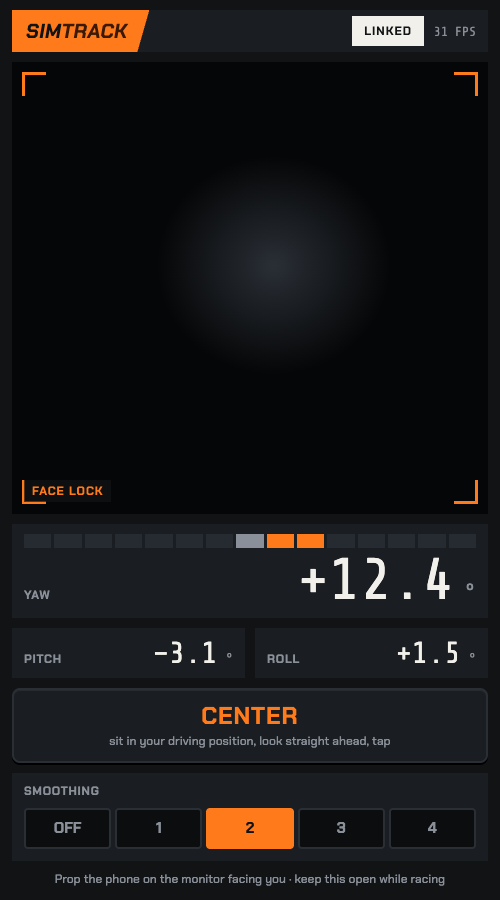
Look straight ahead and tap Center. TrackIR games pick it up on their own.
Specs
- Tracks
- Turn, nod and tilt, measured against how you sit, so the phone's angle on the monitor doesn't skew the reading.Leaning (in and out, side to side, up and down) is new in 0.2 and still being tested in games.
- Game output
- TrackIR and FreeTrack 2.0, built in. OpenTrack UDP on port 4242 if you already use it.
- Tuning
- Sensitivity per axis, a deadzone, and a five-position smoothing switch from raw to steady. Saved between sessions.
- Recenter
- The Center button on the phone or the PC, or Scroll Lock mid-race.
- Test
- The PC window shows where the game is looking. Test Motion sweeps every axis without the phone, so you can check a game before you sit down.
- Privacy
- Video never leaves the phone. Tracking data stays on your WiFi. If the phone drops, the view returns to center.
- You need
- A Windows 10 or 11 PC and a phone from the last few years, on the same WiFi. 5 GHz WiFi is best.
Games
SimTrack talks to games directly over the TrackIR and FreeTrack protocols. A game goes on the verified list only after someone has run it with SimTrack. If yours doesn't work, you get a refund.
Buyers who confirm a game on Discord get it added here.
- iRacing
- Assetto Corsa Competizione
- Le Mans Ultimate
- rFactor 2
- RaceRoom
- DiRT Rally 2.0
- MS Flight Simulator
- DCS World
- X-Plane
- IL-2 Great Battles
- War Thunder
- Euro Truck Simulator 2
- American Truck Simulator
- BeamNG.drive
- Elite Dangerous
- Star Citizen
Automobilista 2 only reads head tracking in its SteamVR mode with the helmet camera, the same as with real TrackIR. We're still testing that.
Price
Pay once. No subscription. Early-access updates are included, and the founder's price ends when early access does.
- SimTrack for Windows
- Every early-access update
- One key, up to 2 PCs
- 14-day refund, any reason
- Setup help on Discord
- Licence key by email
Checkout by Lemon Squeezy, our reseller. VAT included where it applies.
SimTrack is made by one person, Paulius Mielkaitis, in Lithuania, and tested on my own sim rig. It's early access: it works in Assetto Corsa today, and I add games to the list as buyers confirm them. Questions and bug reports come straight to me.
Paulius · support@getsimtrack.com
Questions
Do I need an app on my phone?
No. It's a web page served by your own PC. You install one small certificate once so the camera is allowed, then it's a bookmark you can add to your home screen.
Why pay when OpenTrack and a webcam are free?
If you have a webcam and like tuning OpenTrack, that's a good free option. SimTrack is for people who'd rather scan a QR code: no webcam, no OpenTrack setup, a few sliders instead of curves, and a test button to check each game. If it isn't worth it to you, the 14-day refund covers you.
How is this different from head-tracking phone apps?
There's nothing to install on the phone, because it runs in the browser. On the PC, SimTrack is what the game talks to directly as TrackIR or FreeTrack, so there's no OpenTrack in between.
Does it track leaning?
Version 0.2 adds leaning in and out, side to side and up and down. It's new and still being tested in games, so treat it as a bonus for now. Turn, nod and tilt are the tested part.
Why does it ask me to install a certificate?
Phone browsers only allow the camera on secure links. SimTrack creates its own secure link to your PC, and nothing goes through the internet. Installing the certificate tells your phone to trust your own PC. Its private key is created on your PC and never leaves it, and you can remove the certificate from your phone's settings at any time. The setup page walks you through it on iPhone and Android.
Does the camera video go anywhere?
No. Face tracking runs on the phone, and only the head position travels over your WiFi to your PC. The only thing that goes online is a version check at startup and a licence check every few days. Details are in the privacy policy.
Will it work with my game?
It works with games that support TrackIR or FreeTrack head tracking, which covers most PC racing, flight, driving and space sims. See the list above. If yours doesn't work, ask for a refund within 14 days.
How does it compare to TrackIR?
TrackIR is dedicated infrared hardware and it's excellent. SimTrack uses a phone camera. It handles mirrors, corners and traffic well. It isn't a €150 infrared sensor and doesn't claim to be.
Is there lag?
A little, because it's a camera over WiFi. A 5 GHz network and a phone from the last few years keep it comfortable. Set the smoothing switch lower for a quicker response, higher for a steadier view.
Windows warns me about the download
Early-access builds may not be code-signed yet. Click More info, then Run anyway. Also click Allow on the firewall prompt, or your phone can't reach the PC.
Mac, console or VR?
Windows PC only. Consoles can't take head-tracking input, and VR headsets track your head themselves.
Does it drain the phone?
Yes. Camera plus face tracking is heavy, so plug it in for long sessions. SimTrack keeps the screen awake by itself.
Can I use it on two PCs?
Yes, one key works on up to 2 PCs at a time. To move it to a third, deactivate it on one of the others from the app.
The view moves the wrong way
That's a one-line fix: a config.json next to SimTrack.exe with {"invert_yaw": true} (or pitch, or roll). Ask on Discord and we'll sort it out.
How do refunds work?
14 days, any reason. Reply to your receipt email. If it didn't work in your game, tell us which one so the list stays accurate.
Stuck? The help page covers connecting, the certificate, games that don't move, and updating.